Sunday, November 13, 2022

How to access SSH of AWS EC2 Instance without keypair/pem file

  •  Login into your instance with the .pem file
  •  sudo su
  •  cd / (just incase)
  •  Edit, vim /etc/ssh/sshd_config and edit or do the equivilent of uncommenting these lines:

Port 22

PasswordAuthentication yes

PermitRootLogin yes

  • Restart sshd service, service sshd restart or systemctl restart sshd or equivilent
  • Set password, passwd
  • Log out and log back in without .pem file ssh root@12.345.67.890


Monday, February 4, 2019

How to access mysql installed on your EC2 instance from your local mysql client (sqlyog ..) [ssh tunnelling]


Assumptions:

-  You have access to EC2 instance with ssh key pair (.pem)
-  Mysql server is installed on you EC2 instance which is up and running
-  You should have one mysql user with all necessary privileges


Create a ssh tunnel on Mac os or linux:


Open command prompt and run below command from your terminal:

ssh -i "My-key
.pem" ubuntu@ec2-13-23--123.us-east-2.compute.amazonaws.com -L 3307:127.0.0.1:3306 -N


[My-key] - Point where your key pair is located

[3307] - Changed the port from 3306 to 3307, in case if you have mysql server already running locally on default port

[L]
- Binds local port to remote host port

[N] - Means forwarding ports

Connect to remote mysql using client:


Here I am connecting with sql yog:


Tuesday, June 9, 2015

Search a file with matching a pattern under directory in linux, unix ..

Run this command
grep -H -r [pattern] [directory]

 pattern - Replace this with your custom patter
 directory - Replace this with your custom patter
-H : means to print the filename for each match.
-r : Read all files under each directory, recursively;


Tuesday, February 24, 2015

Javascript closure simple example snippet

Demo
Counting with a local variable.

0


Wednesday, January 7, 2015

How to make triangles or arrows using css border width


h2.entry-title { position: relative; }
h2.entry-title:after { content: ""; border-width: 15px; position: absolute; left: 179px; top: -4px; border-style: solid; border-left-width: 0; border-right: 15px solid green; border-left: 15px solid yellow; }

with all borders


h2.left-triangle:after { border:15px solid transparent; border-right: 15px solid green; }

left triangle


h2.right-triangle:after { border:15px solid transparent; border-left: 15px solid green; }

right triangle


h2.top-triangle:after { border:15px solid transparent; border-bottom: 15px solid green; }

top triangle


h2.down-triangle:after { border:15px solid transparent; border-top: 15px solid green; }

down triangle


Monday, September 1, 2014

Barchart using css and angularjs

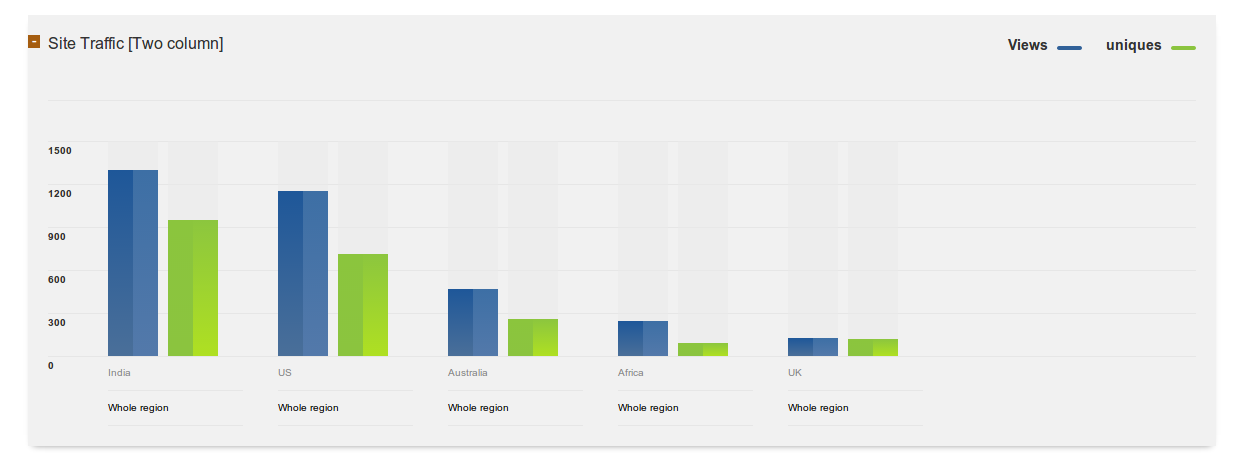
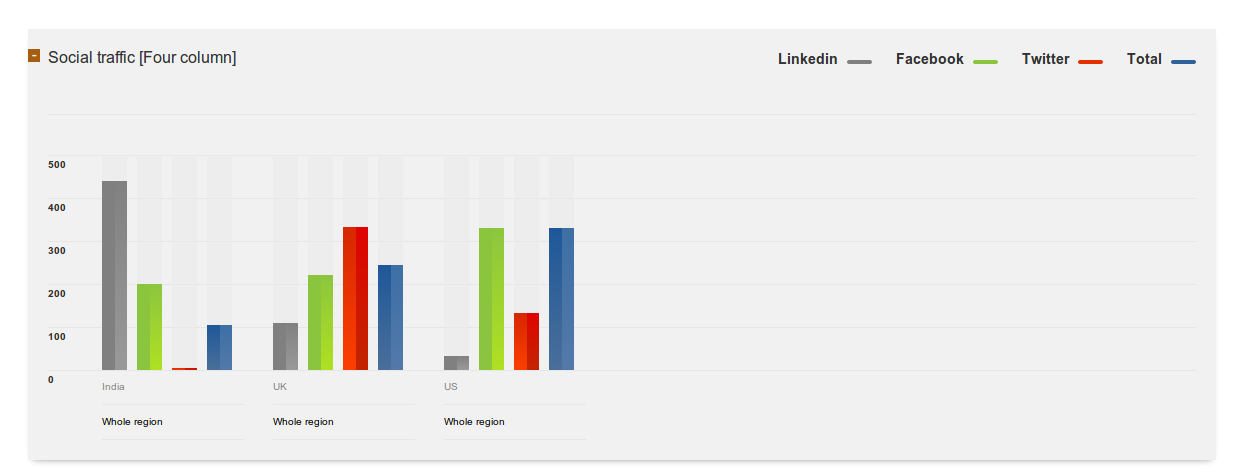
Recently, I came across situation like generating a dynamic graph shown in screen-shot below. I have searched a lot for any javascript api to generate graph/chart like google chart, chartJs etc. But failed. Later decided to develop it with myself using css and angularJs, here is the github code, fork it and contribute :) happy coding!!  ( https://github.com/munawer-t/bar-chart-using-pure-css3-and-angularjs )


Friday, July 12, 2013

How turn on sql_mode to stric in mysql

1) Edit my.cnf
For Debian :
located at /etc/mysql/my.cnf , add to my.cnf
    [mysqld]
    sql_mode="STRICT_ALL_TABLES"
 If you want strict mode with full group by use this
[mysqld]
sql_mode="STRICT_ALL_TABLES,ONLY_FULL_GROUP_BY"

2) Restart mysql

3) Check it by running this query
SELECT @@GLOBAL.sql_mode;
Note: If you want turn off strict mode on run time just run this query
SET @@global.sql_mode='STRICT_ALL_TABLES'
OR
SET @@session.sql_mode='STRICT_ALL_TABLES'
Thats it.


Wednesday, March 27, 2013

Working with GhostScript : Convert PDF to images using ghostscript


Ghostscript is an interpreter for PostScript™ and (PDF) files, lets see how we can use it convert PDF to images.

-Install Ghostscript (I am using ubunutu, so I can perform)
sudo apt-get install ghostscript

- run these script via console to make images from pdf

gs -dUseCropBox -dTextAlphaBits=4 -dGraphicsAlphaBits=4 -dAdjustWidth=0 -dNOPROMPT -sDEVICE=jpeg -dSAFER -dBATCH -dNOPAUSE -r140 -dJPEGQ=80  -dFirstPage='1' -dLastPage='8' -sOutputFile=/tmp/output/image-%d.jpg /tmp/downloads/sample.pdf

You can see output like this :


and your output folders will list your images :


FYI - Params :
-dFirstPage and -dLastPage specifies page limits , which is optional
-sOutputFile [output file] [input file]


:)


Wednesday, March 6, 2013

How to add force quit option in ubutnu 12.04

Just got updated my ubuntu version to 12.04 , One of my favorite tool was missing there -Force Quit .
Followed these step and I restored it there in panel

1- create a file named 'Force_Quit.desktop' and contents should be like this

[Desktop Entry]
Name=Force Quit
Comment=Force Kill an Unresponsive Running Application or Window
Exec=xkill
Icon=gnome-panel-force-quit
Terminal=false
Type=Application
StartupNotify=true

2- Place it applications folder , you can open application folder directly using these command
    nautilus ~/.local/share/applications/
3- Drag and drop 'Force_Quit.desktop' file in to Unity launcher.

Thats it !


Tuesday, May 8, 2012

How to check if a controller exists using Zend Framework

Have you ever wondered how to check if a controller/action exist in zend FM from any side of app ? Here is the code

        $front = Zend_Controller_Front::getInstance();
        $dispatcher = $front->getDispatcher();

        $test = new Zend_Controller_Request_Http();
        $test->setParams(array(
            'action' => 'index',
            'controller' => 'content',

                )
        );

        if($dispatcher->isDispatchable($test)) {
            echo "yes-its a controller";
            //$this->_forward('about-us', 'content'); // Do whatever you want
        } else {
            echo "NO- its not a Controller";
        }


Tuesday, March 20, 2012

cool js beautifier

Hi,

Just fond a good js beautifier at http://jsbeautifier.org/ , you can use it for extracting minified js too ,
Njoy

Wednesday, February 15, 2012

facebook heatmap

Here is how facebook heat-map look like ..


more on -

http://mashable.com/2011/11/30/social-profile-eye-tracking/

Monday, February 13, 2012

WordPress Plugins that Boost up your Blog

Search Regex
Redirection
Bing 404
WordPress SEO
Hyper Cache
FB Open Graph
404 Email Notifier
SlideShare
Smart YouTube
YARRP
WP Optimize
WP-DBManager
Debug Queries
Auto Post Thumbnail
Regenerate Thumbnails
Google XML Sitemaps
XML Video Sitemap
Date in a Nice Tone

.. more you can find on -- http://www.labnol.org/software/must-have-wordpress-plugins/14034/

Friday, February 3, 2012

Add custom domains to Your openshift account


Hurray !!


It is now possible to use rhc-ctl-app -a appname -c add-alias --alias www.mydomain.com

and then in your DNS management for mydomain.com you can add a cname to point www.mydomain.com to app-namespace.rhcloud.com.


Wednesday, January 11, 2012

A cool audio player for ubuntu "Clementine"

Hey Ubuntu lovers ,

Just got my attention on one cool audio player "Clementine" which can be installed on ubuntu .
Check it out , no more descriptions ;)
command :
sudo apt-get install clementine


Thursday, December 15, 2011

Hey , now you can run PHP from Google apps Engine (GAE)

Now you can run PHP on GAE using Quercus
1) Register a free account.
2) Download this file to your computer.
3) Edit application XML tag in the file war\WEB-INF\appengine-web.xml to the name of the application you have registered.
4) Finally upload your application. I downloaded Google App Engine SDK for Java and use the following command in windows.
appcfg.cmd update C:\projects\phpwithjava\war

To see this in action just visit:

http://phponair.appspot.com/my.php

Thursday, August 11, 2011

How to save MySQL query results into a text or CSV file

Below query writes resultsset to .txt file :-

SELECT order_id,product_name,qty
FROM orders
INTO OUTFILE '/tmp/orders.txt'


To make csv , try this one :-

SELECT order_id,product_name,qty
FROM orders
INTO OUTFILE '/tmp/orders.csv'
FIELDS TERMINATED BY ','
ENCLOSED BY '"'
LINES TERMINATED BY '\n' ;


phewww...


Tuesday, May 17, 2011

How to enable secure http (https) in your localmachine

To enable https in your local machine is not a tough game , its simple .
I have performed only few steps in my ubuntu ,just check it out

  • openssl genrsa -out yourX.key 1024
  • openssl req -new -key yourX.key -out yourX.csr
  • openssl req -new -key yourX.key -x509 -out yourX.crt -days 365

Run these 3 commands inside a folder , 'yourX' should be replaced with your application name .These commands will generate 3 files , here they are yourX.key,yourX.csr,yourX.crt .

After finishing the above task add virtualhost within your httpd.conf (or httpd-vhosts.conf on some systems)


<VirtualHost my.localhost:443>
DocumentRoot "/PATH TO YOUR APP/"
ServerName my.localhost
SetEnv APPSTAGE development
<Directory /PATH TO YOUR APP/>
DirectoryIndex index.php
AllowOverride All
Order allow,deny
Allow from all
</Directory>
SSLEngine On
SSLCertificateFile /PATH TO CRT FILE/yourX.crt
SSLCertificateKeyFile /PATH TO KEY FILE/yourX.key
</VirtualHost>

*NOTE: sometimes you may get error like this  "Invalid command 'SSLEngine', perhaps misspelled or defined by a module not included in the server configuration Action 'configtest' failed"
In that case please make sure ssl is enabled ,please run 'a2enmod ssl' to get it working.


Hope it will help you guys :)

-cheers


Wednesday, May 19, 2010

How to Add the Facebook Like button in blogger

1. Login to your Blogger Account and go to Layout > Edit HTML and click on the check box which says “Expand Widget Templates

2. Look for <data:post.body/> and immediately after that place the following code.

<b:if cond='data:blog.pageType == &quot;item&quot;'>
<iframe allowTransparency='true' expr:src='&quot;http://www.facebook.com/plugins/like.php?href=&quot; + data:post.url + &quot;&amp;layout=standard&amp;show_faces=false&amp;width=100&amp;action=like&amp;font=arial&amp;colorscheme=light&quot;' frameborder='0' scrolling='no' style='border:none; overflow:hidden; width:450px; height:40px;'/>
</b:if>

This code will show the Like Button on Post pages only. If you want to display it everywhere, then remove the two lines of code in red.

3. Save the template and you're done

Any queries? ..comment here .


Monday, March 8, 2010

wow posterous

Started a posterous account , which has an option to link twitter,facebook,blogger and almost everything .One post to posterous goes everywhere else on the web .One of the main advantage is we can post it via mail, that means even through mobile too . I have made an account here http://photos.munawer.in/ for sharing photos on the go through mobile